
10 AI Social Media Design Tools Every Business Should Try
I’ve watched social media turn from a casual networking channel into a digital storefront for American businesses. A coffee shop in Austin, a startup in New York, and a contractor in Phoenix can all compete for attention in the same thumb-sized screen. That makes strong Social Media Design part of the sales conversation, not just decoration.
The problem? Most teams don’t have endless hours for layouts, resizing, revisions, and the classic “one tiny change” that eats half an afternoon. AI can remove much of that repetitive work. I still want human taste in charge, but the right tool can help me move from a blank canvas to a useful concept much faster.
If you want a practical starting point, I recommend treating Social Media Design as a complete content discipline. I also like pairing AI with a clear brand system because speed without consistency simply creates a bigger pile of forgettable posts.
What I Look for in an AI Design Tool
I ask four questions before choosing a platform: Can I create a strong first draft quickly? Can I keep the brand consistent? Can I adapt content for different platforms? Can I edit the AI output without fighting the software?
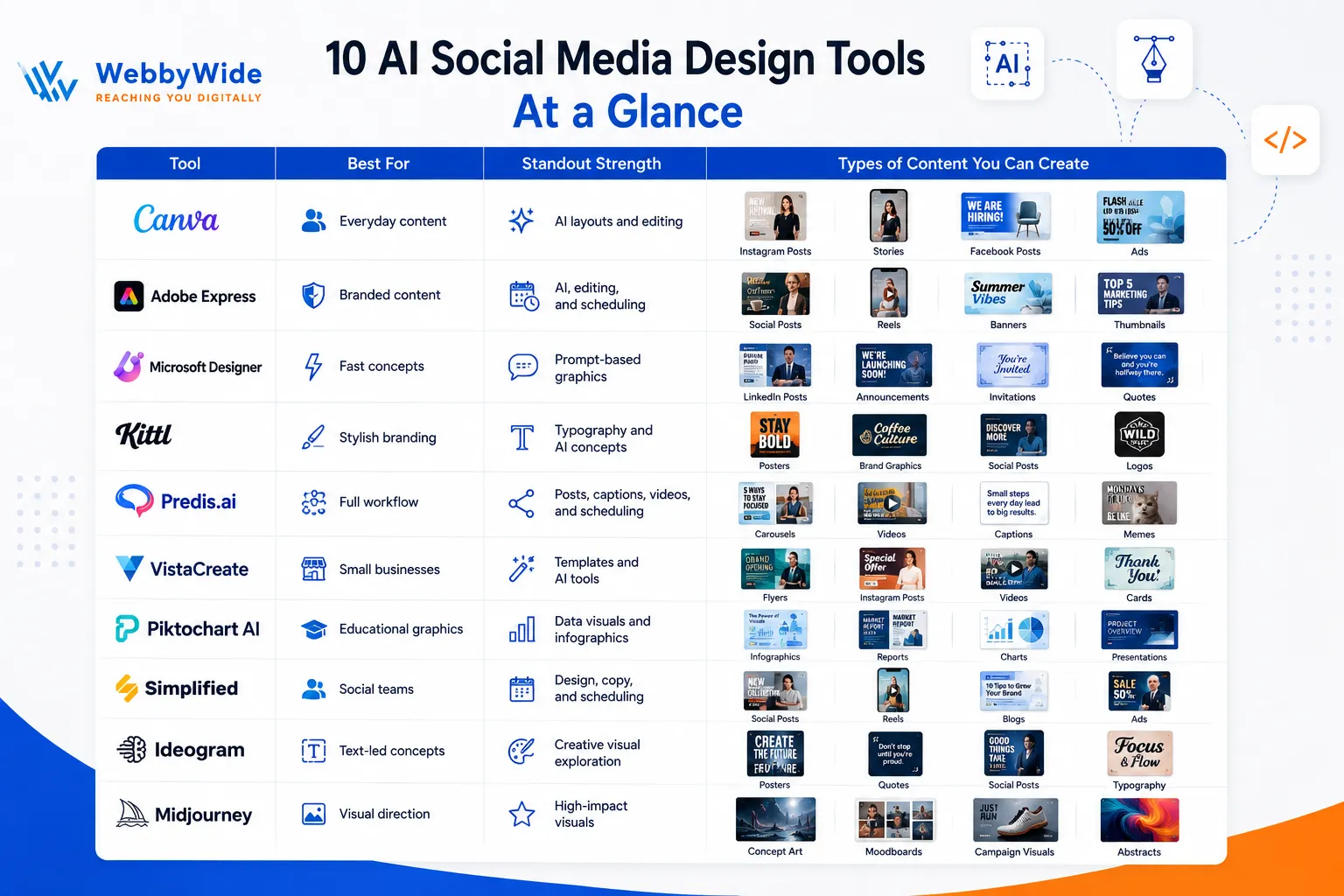
10 AI Social Media Design Tools Worth Trying
|
Tool |
Best for |
Standout strength |
|
Canva |
Everyday content |
AI layouts and editing |
|
Adobe Express |
Branded content |
AI, editing, scheduling |
|
Microsoft Designer |
Fast concepts |
Prompt-based graphics |
|
Kittl |
Stylish branding |
Typography and AI concepts |
|
Predis.ai |
Full workflow |
Posts, captions, videos, scheduling |
|
VistaCreate |
Small businesses |
Templates and AI |
|
Piktochart AI |
Educational graphics |
Editable information visuals |
|
Simplified |
Social teams |
Design, copy, scheduling |
|
Ideogram |
Text-led concepts |
Creative visual exploration |
|
Midjourney |
Visual direction |
High-impact concepts |
1. Canva: My All-Around Pick
When I need to turn “we should post something” into an actual Social Media Design graphic, Canva sits near the top of my list. Its AI tools can help generate design directions, work from existing media, and create adaptable content.
I can let AI provide the first idea, then adjust the headline, spacing, colors, imagery, and layout until the Social Media Design feels intentional.
Best for: Teams that want speed, flexibility, and an easy learning curve.
2. Adobe Express: Best for Creative Teams
I turn to Adobe Express when I want quick production alongside familiar creative tools. It combines templates, generative AI, editing, and content scheduling, helping me move from concept toward publishing with fewer steps. For a broader look at current AI social content tools, I also recommend this AI social media content creation guide.
For Social Media Design, I value that balance because I can explore an AI idea without giving up creative control.
Best for: Businesses that want AI convenience with strong creative control.
3. Microsoft Designer: Best for Quick Ideas
Microsoft Designer works well when I need a visual concept without setting up a complicated file. I can describe the post, explore AI-generated directions, and refine the result.
For Social Media Design, I get better results when I give the tool a clear audience, message, mood, and platform.
Best for: Busy professionals who need fast visual concepts.
4. Kittl: Best for Bold, Stylish Branding
Kittl catches my attention when typography and personality matter. Its AI features, templates, and editing tools give me room to explore strong Social Media Design directions without settling for a bland template.
It helps me create Social Media Design with more character when type plays a major role.
Best for: Brands that want expressive typography and memorable visuals.
5. Predis.ai: Best for the Full Social Workflow
Predis.ai takes a broader approach. It can help create visuals, captions, carousels, videos, hashtags, and scheduled posts from a connected workflow.
A connected workflow can remove friction and make Social Media Design easier to scale.
Best for: Small teams that want content creation and scheduling together.
6. VistaCreate: Best for Small Businesses
I recommend VistaCreate when a business wants a straightforward platform with a large template library and built-in AI tools. I can create posts, videos, marketing graphics, and branded content without making every task feel like a major production.
For Social Media Design, I like that flexibility because local businesses often need fresh promotions without creating every asset from scratch.
Best for: Small businesses, creators, and marketers.
7. Piktochart AI: Best for Educational Content
When I need a post to explain something rather than simply announce something, I look at Piktochart AI. It can turn a campaign idea, audience, or content brief into an editable visual draft.
For educational Social Media Design graphics, I’d rather give an audience a clean visual explanation than squeeze an essay into a caption.
Best for: Brands that rely on educational or data-driven content.
8. Simplified: Best for Social Teams
Simplified brings Social Media Design, AI writing, content management, and scheduling into one workspace. I like that setup when a team publishes frequently and wants fewer tabs, exports, and disconnected files.
That makes Social Media Design easier to manage as a repeatable workflow.
Best for: Social media managers who want an integrated workflow.
9. Ideogram: Best for Creative Concepts With Text
I like Ideogram when I want to explore Social Media Design concepts that depend heavily on typography or a specific creative idea. I can experiment with poster-style directions, campaign imagery, and headline-driven concepts.
That helps me keep Social Media Design distinctive instead of letting every campaign develop the same personality.
Best for: Concept exploration and text-led creative directions.
10. Midjourney: Best for High-Impact Visual Direction
When I want something cinematic, unusual, or ambitious, I consider Midjourney. I use it more like a creative studio for exploring campaign directions than a traditional social editor.
I never expect one prompt to deliver a finished campaign. I use AI to explore ideas, then build the final Social Media Design around the business message.
Best for: High-concept visuals and creative exploration.
How I’d Choose the Right Tool
I wouldn’t choose based on the longest feature list. I’d choose based on the bottleneck.
For quick branded posts, I’d start with Canva or Adobe Express. For typography-heavy work, I’d test Kittl. For an end-to-end workflow, I’d explore Predis.ai or Simplified. For educational Social Media Design graphics, I’d consider Piktochart. For visual experimentation, I’d test Ideogram or Midjourney.
I’d also run the same brief through two or three tools with the same audience, message, colors, format, and goal. Then I’d compare the results.
AI Can Speed Up Design, But It Can’t Replace Taste
I’ve learned one rule that saves me frustration: faster creation does not automatically mean better communication.
A polished graphic can still miss the point. A trendy AI image can still feel wrong for the audience. A clever headline can still sound like every other brand on LinkedIn.
That’s why I keep human judgment in the loop. I check hierarchy, readability, accessibility, image quality, brand fit, and whether the CTA stands out.
I also think businesses should understand the bigger conversation around AI and graphic design. AI can accelerate production, but creative direction still gives a brand its personality.
A Simple AI Social Design Workflow I’d Use
- Define the goal. I decide whether I want awareness, engagement, clicks, leads, or sales.
- Write the message first. I give AI the headline, audience, offer, and CTA.
- Generate several directions. I create multiple concepts instead of accepting the first result.
- Apply brand rules. I add the correct logo, colors, fonts, imagery, and tone.
- Adapt for each platform. I avoid blindly copying one format everywhere.
- Review before publishing. I check spelling, facts, image quality, accessibility, and brand fit.
- Study performance. I watch saves, shares, clicks, comments, and conversions.
- Improve the next design. I use audience behavior to guide the next round.
If I need more hands-on support, social media design services can help turn AI tools into a consistent content system.
What About Professional Designers?
I don’t see AI as a reason to abandon designers. I see it as another layer in the creative toolkit.
A professional brings strategy, composition, typography, audience awareness, brand thinking, and the judgment to recognize when an idea doesn’t work. AI can produce options; a skilled designer can decide which option deserves to become the final campaign.
When I need a complete identity, campaign system, website visuals, or consistent brand assets, I want professional graphic design services involved.
Final Thoughts
I see AI as one of the most useful additions to a modern creative workflow, especially for businesses that need more content without endless production hours. The best Social Media Design tools can help me brainstorm faster, create variations, repurpose ideas, and keep campaigns moving.
Still, I wouldn’t chase every shiny AI feature. I’d pick one or two tools and treat Social Media Design as a repeatable system. I’d test them against real business goals and build a process around what works. The goal isn’t to make more graphics just because I can. The goal is to make better Social Media Design content that earns attention and to keep Social Media Design useful.
If you want to turn AI-assisted ideas into polished, strategic content, get in touch with our design team. I’d love to help you build Social Media Design that looks sharp, feels human, and gives your business a stronger presence in the feed.
FAQs About AI Social Media Design Tools
I use the term for software that applies AI to visual content creation. Depending on the platform, it can generate layouts, images, text, variations, or complete posts. Yes. I think small businesses can gain a lot because AI can reduce repetitive production work. I still recommend setting clear brand rules before generating dozens of posts. Yes. Several tools can turn a written idea into a visual concept or a more complete post. I still review every result because AI can misunderstand context, wording, or brand requirements. I’d start with Canva for general Social Media Design, Adobe Express for creative flexibility, or Predis.ai for a broader workflow. Your best choice depends on your biggest bottleneck. I don’t think it replaces the strategic and creative judgment that a strong designer brings. AI can help with speed and exploration while designers guide the concept and protect brand consistency. I start with a simple brand guide covering colors, fonts, logo use, imagery, tone, and layout preferences. Then I give the AI specific instructions and review every final design. 10 AI Social Media Design Tools Every Business Should Try

Comments
Add Comments
Update Comment